Restaurant management software that puts the whole business in one place
Your menu, tables, staff, stock, shifts and reports live in one dashboard you open on a laptop, tablet or phone. Change a price, add a waiter or check today’s sales from wherever you are, and see what needs your attention before it costs you.
- Menu with half & full plates
- Staff roles & PIN sign-in
- Sales & GST reports
- English, Hindi & Tamil
A drawing of the Ubasari dashboard. The figures are made up.
Running a restaurant shouldn’t mean ten notebooks and a WhatsApp group
The menu in one place, staff logins in another, sales in the bill book. Here is the same week run from one dashboard.
A price goes up
The usual way: You tell every cashier, and someone still bills the old price for a week.
With Ubasari: Change it once in the menu. The counter and the guest menu bill the new price.
The last paneer tikka
The usual way: Guests keep ordering it from the QR menu after the kitchen has run out.
With Ubasari: Switch it off and the guest menu shows it as unavailable, so nobody can order it.
A new waiter joins
The usual way: They share someone’s login, and nobody knows who gave that discount.
With Ubasari: Add them with their phone number. They sign in with a 4-digit PIN of their own.
Someone leaves
The usual way: Their login still works weeks later.
With Ubasari: Deactivate them and they are signed out of every device at once.
The end of the day
The usual way: Sales are added up from the bill book, and nobody knows which dish sold.
With Ubasari: The dashboard shows net sales, bills, the average bill and your top dishes, by the day each bill was paid.
Month end
The usual way: The accountant waits while you hunt for GST totals.
With Ubasari: The GST report shows taxable value and tax collected on each line, for any dates you pick.
Your back office, from the menu to the money
Six screens an owner opens every week, and what each one does.
- Menu
Your whole menu, half plates and add-ons included
Group dishes into categories and drag them into the order guests should see. Give a dish a Half and Full plate, each with its own price, and add-ons like extra cheese that add to the bill. Say whether a guest must choose and how many extras they can pick.
- Photos, descriptions, veg, vegan and spicy tags, and allergens like nuts and dairy
- Mark many dishes available or unavailable, or move them to another category, in one go
- Bring your menu in from a CSV file instead of typing it
- Tables & floor
Set up your floor once, and everyone works from it
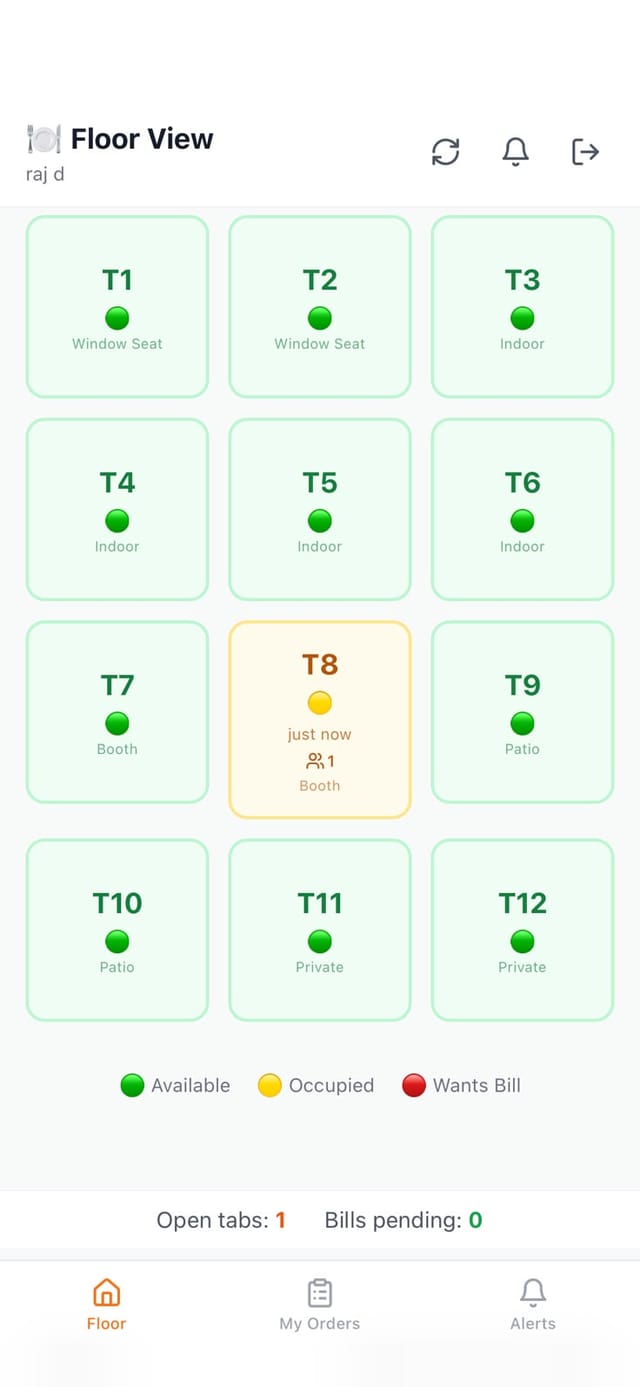
Add each table with its number and seats, and group them into zones like AC, Non-AC, Bar or Rooftop. On Growth and Max, the waiter app’s floor shows the same tables, with the ones in use marked, and each table gets its own QR code for guests.
- Download a table’s QR code to print, or make a fresh one if a sticker is copied
- See a table’s open sessions and close them once the guests have gone
- A deleted table goes to a recycle bin, so you can bring it back
- Staff & permissions
Everyone signs in as themselves, with only what their job needs
Add owners, admins, waiters and kitchen staff. Waiters and cooks sign in with their phone number and a 4-digit PIN. Owners and admins run the menu, tables, reports and settings, and only an owner can change the outlet’s GSTIN and FSSAI details or the plan.
- Deactivate someone and they are signed out of every device at once
- Reset a password or make a new PIN in a tap
- Refunds, voids and big discounts ask for a manager’s PIN
- Sales dashboard
Know how today is going without calling the counter
Net sales, bills and the average bill, each set against the period before. See how orders came in, how guests paid, your top dishes and your busiest hours. A Right now panel shows open orders, tables in use and the longest wait.
- Counts only bills that were paid, the same way as the daily sales report
- Updates every minute, and the sales chart downloads as a CSV file
- Reorder or hide parts of the dashboard so what you check first comes first
- Needs attention
Spot the leaks before the month is over
The dashboard lists what needs you: dishes sold out, dishes selling half as often as usual and, with recipes switched on, dishes priced below their ingredient cost and ingredients running low. Loss watch adds up voids, refunds, staff discounts and short cash drawers.
- Loss watch shows who did each one, staff member by staff member
- The top reason given for voids, at a glance
- Low guest ratings are flagged so you can follow up
- Reports
Reports your accountant can work from
The daily sales report shows net sales, money collected by cash, card and UPI, tax on each line, refunds and voids, and every shift that day. The GST report gives taxable value and tax collected for any period up to a year.
- Every refund listed with its reason, and every shift’s Z-report
- Download your orders and guest feedback as CSV files
- Pick any business day and step back through earlier ones

Set up the back office in an afternoon
All from the dashboard, on a laptop or your phone.
- 1
Add your menu
Type it in or import a CSV, then add half and full plates and add-ons.
- 2
Set up your tables
Add each table with its seats, group them into zones and print the QR codes.
- 3
Add your team
Give each person a role. Waiters and cooks get a PIN to sign in with.
- 4
Choose how you take orders
Counter only, counter plus kitchen screens, or the full setup. Switch any time in Settings.
Every part of the restaurant, under one login
Each of these has its own page. Here is what it does in a line.
Recipes & stock
Write each dish’s recipe once and its ingredients come off stock as orders are served, with a margin on every dish. On Growth and Max.
Shifts & cash drawer
Open each shift with a float, record pay-ins and pay-outs, and close with a count and a Z-report.
GST bills & KOTs
CGST and SGST worked out on every bill, and KOTs printed for each kitchen station.
WhatsApp & reviews
Send bills and order updates from your own WhatsApp Business number, and read every rating on one page.
AI dish photos
Describe a dish and get a menu photo you can keep or redo. On Growth and Max.
Offers & promo codes
Discount codes with a minimum order, a cap on the discount, usage limits and an end date. On Growth and Max.
Made for the people who run the place
From the owner checking sales at home to the manager at the outlet.
The owner
Check today’s sales, loss watch and low ratings on your phone, and change a price without going in.
The manager
Run the menu, tables, staff and reports from the outlet’s laptop or tablet, in English, Hindi or Tamil.
Owners with several outlets
Switch outlets in a click and give each manager only their own. We switch this on per business as we roll it out.
- Every plan: menu, tables, staff, the sales dashboard, daily sales and GST reports
- Growth and Max: recipes & stock, promo codes, the QR menu and the waiter app
- Max: an audit log of who did what, and your own brand colour
- How far back the dashboard looks grows with your plan
It all works together
Every part of Ubasari shares the same menu, orders and reports, so a change in one place shows up everywhere.
Questions owners ask about restaurant management software
See your own restaurant in the dashboard, on your demo call
Send us your menu. We’ll load it with you, add a half plate and a waiter, and walk through the dashboard and reports your outlet will see.
Questions first? Message us on WhatsApp
- No credit card required
- Cancel any time
- Live in 30 minutes