Every dish goes to the station that cooks it
Ubasari Kitchen shows each station only its part of every order, so the tandoor sees the naan and the bar sees the lassi. Run it on a tablet in the kitchen, a screen on the wall or each cook’s own phone, and the counter hears the moment food is ready.
- Each station sees only its dishes
- Runs on cooks’ own phones
- Keeps working offline
- Rings a locked phone


Real screens from a sample kitchen. Names and orders are made up.
A busy kitchen shouldn’t run on shouting and paper
Most kitchens share one printer and a pile of KOTs, and someone calls out what goes where. Here is the same service with a screen for every station.
The dinner rush
The usual way: One printer prints every KOT, and someone shouts the drinks across to the bar.
With Ubasari: Each order splits itself. The bar’s screen shows the lassi, the tandoor’s shows the naan.
A table orders more
The usual way: The waiter walks a second slip to the kitchen, or the kitchen never hears.
With Ubasari: The new dishes arrive as Round 2, on the stations that cook them.
A dish is cancelled
The usual way: The cook finds out after it is made.
With Ubasari: The dish is struck through as cancelled on the kitchen screen, and a cancellation slip prints where its KOT did.
The cook steps away
The usual way: The order waits on a screen nobody is looking at.
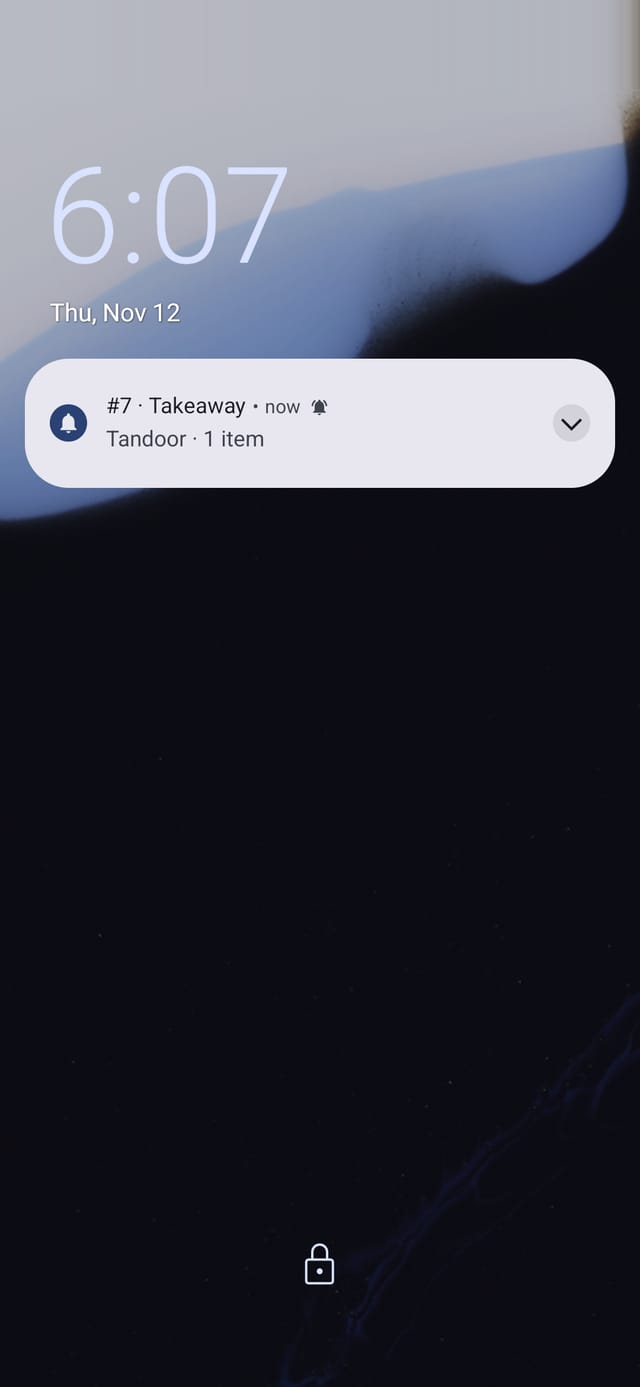
With Ubasari: Their phone rings on the lock screen with the order number and their station.
The Wi-Fi drops
The usual way: The screen freezes and nobody knows what was started.
With Ubasari: The kitchen screen keeps working. Every tap is saved and sent once the internet is back.
The food is ready
The usual way: The cook calls the number and hopes the counter heard.
With Ubasari: The counter chimes and shows the number and the guest’s name. One tap hands it over.
Built for your kitchen, from the tandoor to the counter
Five things change in your kitchen on the first night.
- Stations
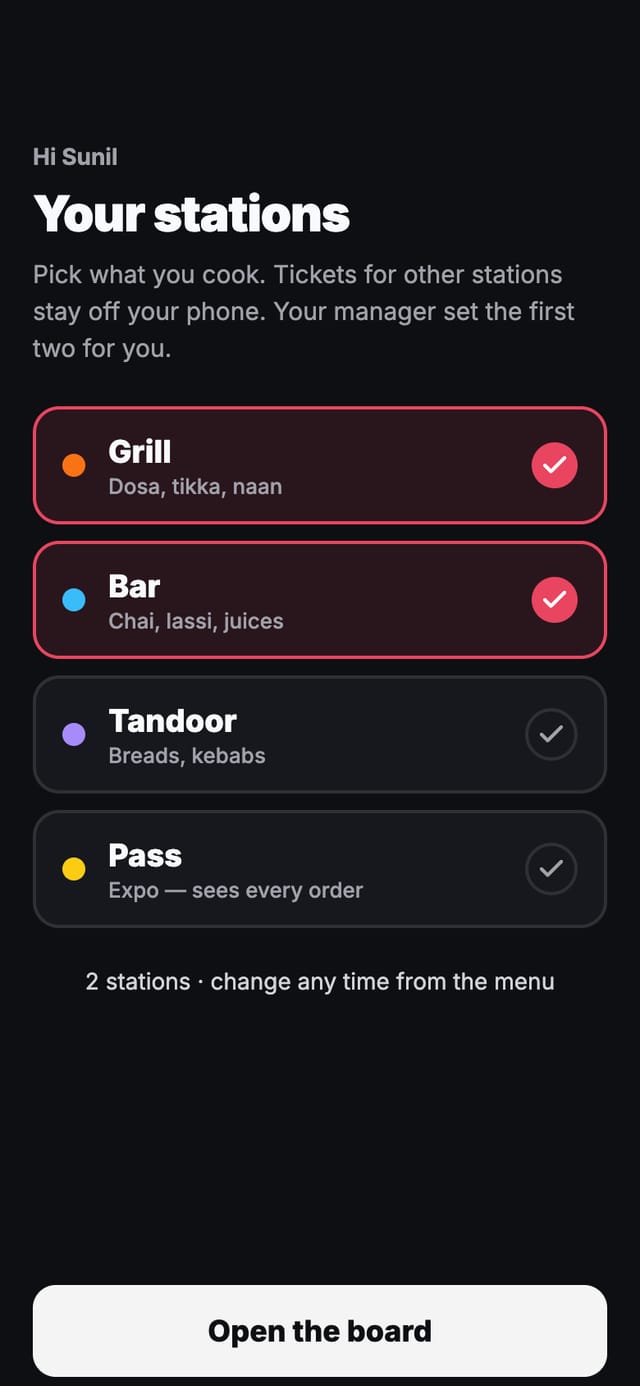
Each station sees only what it cooks
Send each menu category to a station, and move single dishes where they belong. Each station sees only its own dishes from every order, so the grill cook never scrolls past the drinks.
- Two or three stations side by side on one tablet, or a screen for each
- Every station has its own amber and red times, so a slow naan and a slow chai are judged apart
- Allergy notes show in full, at the top of the order
- Cooks’ own phones
Cooks work from the phone in their pocket
A cook signs in with their phone number and PIN, picks the stations they are on tonight, and gets a screen made for one hand: big Start and Ready buttons, with New, Cooking and Ready tabs in thumb reach.
- You set each cook’s usual stations. They can change them from the menu
- Phones never count toward your plan’s kitchen screens
- When someone leaves, sign their phone out from Settings and the kitchen screen on it closes at once
- Alerts when locked
A locked phone still rings for a new order
Turn alerts on and the phone rings on its lock screen for every new order its stations cook, even with the app closed. One alert per order, with the order number, the stations and how many items.
- In the Ubasari Kitchen Android app, alerts ring at alarm volume
- Alerts never carry the guest’s name, notes or dishes
- Works in the phone’s browser too. On an iPhone, add it to the Home Screen first
- Counter and head chef
The counter knows the moment food is ready
When the last station taps Ready, the order lands on the counter’s Ready strip with its number, the guest’s name and a chime. One tap hands it over. A busy kitchen can add a head chef’s screen that holds each order until every station is done.
- The head chef sees each order’s stations as Waiting, Cooking or Ready
- At shift close, hand over anything still waiting in one tap
- No one to hand food over? Let the cook’s Ready tap serve the order
- Station printing
Paper where you still want it, and none of it lost
Choose which stations a screen’s printer prints. The bar can get its KOTs without a screen of its own, each slip headed KOT - BAR with only the bar’s items.
- Out of paper? The KOT waits, the screen says so, and it prints once you tap Try again
- A cancelled dish prints a cancellation slip, so it is not made
- Reloading a screen never prints the same KOT twice


From your menu to the first order in four steps
You set the kitchen up once, from Settings → Kitchen on your phone or laptop.
- 1
Set up your stations
Name each station, give it a colour and its own amber and red times, and choose which menu categories it cooks.
- 2
Add screens and cooks
A new screen shows a code and a QR. Scan it from your phone to add it. Cooks sign in on their own phones with a PIN.
- 3
Orders split themselves
Every order, from the counter, a waiter or a table QR, reaches each station that cooks something in it.
- 4
Ready reaches the counter
When every station is done, the order is ready. The counter, a waiter or the head chef hands it over, and stock moves.
Made for a hot, loud kitchen on a Saturday night
The small things that keep orders moving when the internet, the printer or the power doesn’t.
Keeps working offline
Every Start and Ready tap is saved on the device and sent when the internet is back. None is sent twice.
Extra orders and cancellations
When a table orders more, the new dishes arrive as Round 2. A cancelled dish is struck through on every kitchen screen.
Dishes still to cook
One tap adds up every dish still to cook across all open orders, so the tandoor knows how many naan to make.
Works with a keypad
No touching the screen with wet hands: arrows pick an order, Enter starts it or marks it ready, R brings it back.
Add a screen with a QR
A new screen shows a code and a QR. Scan it from your phone and pick its stations. Nobody types on the kitchen screen.
An Android app for the wall
Ubasari Kitchen keeps the screen awake, opens itself again after a power cut, and can be locked to the kitchen app.
Fits the kitchen you already run
Dosa and biryani counters, cafés, bakeries and full-service restaurants with a tandoor, a kitchen and a bar.
Counter and cooks’ phones
Every order is rung up at the counter, each cook works from their own phone, and the counter hands the food over. Nothing to buy for the kitchen.
One tablet in the kitchen
One tablet shows the tandoor, the kitchen and the bar side by side, and its printer prints the bar’s KOTs.
Full service with a head chef
Table QR and waiter orders too, a screen at each station, and a head chef’s screen that checks every order before it goes out.
- Core: 2 kitchen screens
- Growth: 5 kitchen screens
- Max: as many screens as you need
- Unlimited stations, and cooks’ phones never count as screens
Questions owners ask about the kitchen display
Watch your menu split into stations, on your demo call
Tell us your stations. We’ll set them up with you, send a test order to a tablet and a phone, and show the counter handing it over.
Questions first? Message us on WhatsApp
- No credit card required
- Cancel any time
- Live in 30 minutes